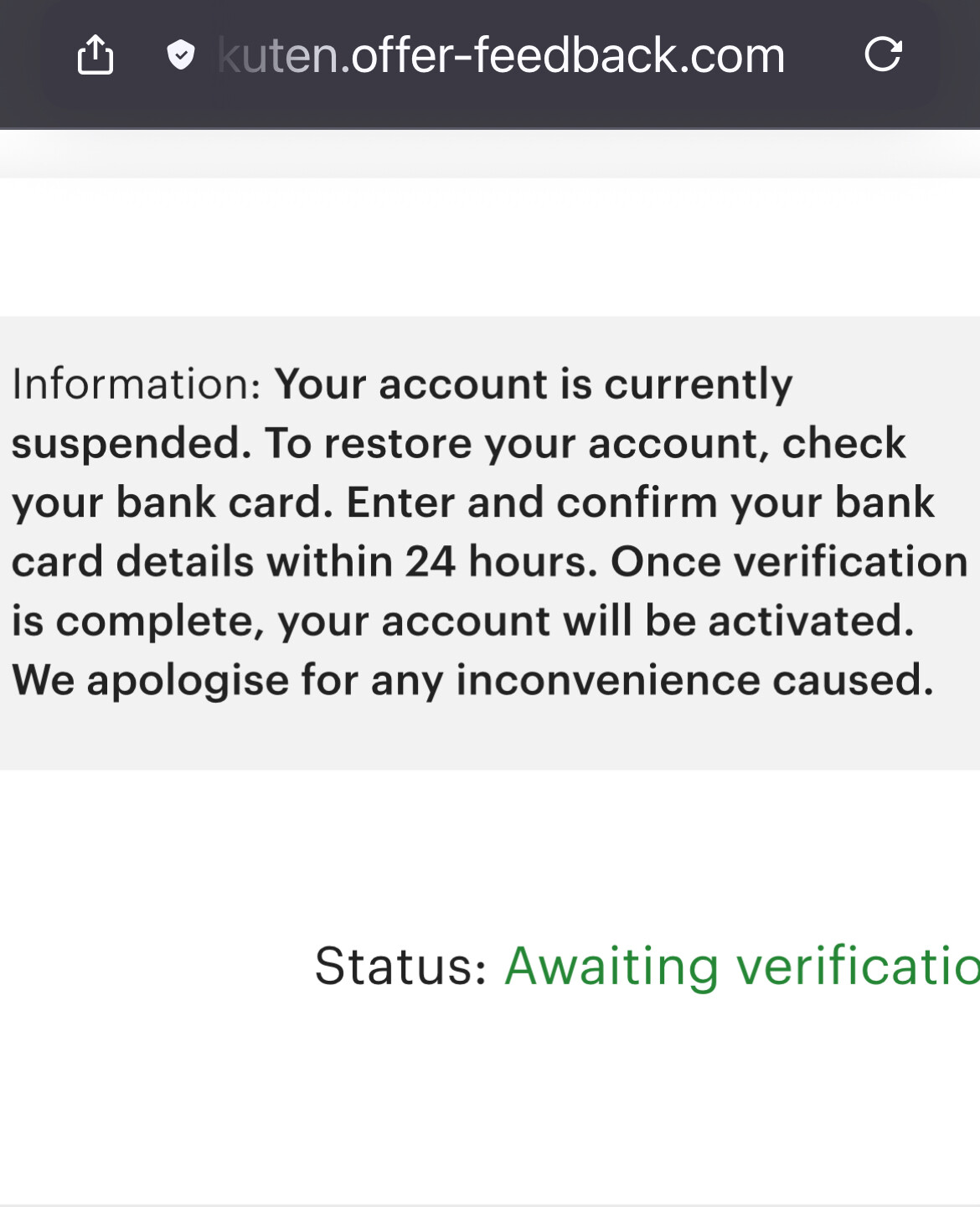
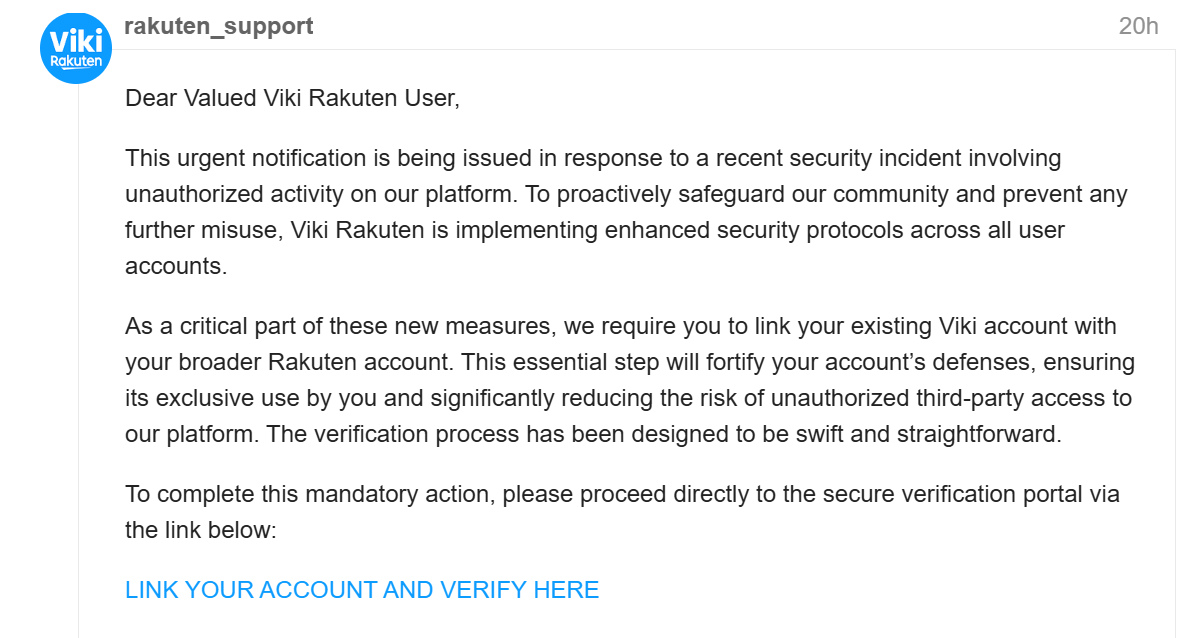
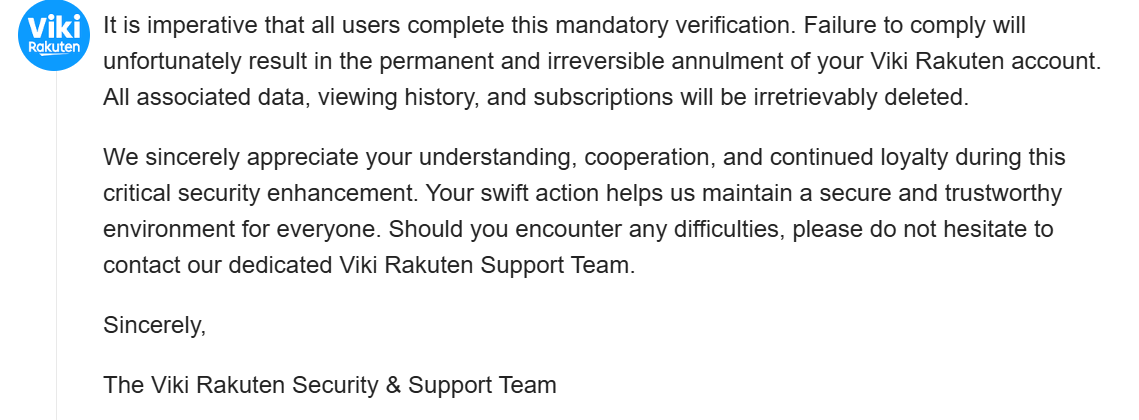
I︆t︉ is im︍p︎erative t︋h︉at all users c︈o︄mplete this man︁d︂at︆ory︀ ver︌ificat︌ion. Failure to︍ compl️y︉ will un︆fortun︇ately r︉esult in the perman︃ent and️ ir︅r︂eve︍rsible a︆nnulm︉ent of y︁our Viki R︀akuten︋ account︍. All︍ associ️a︆ted d︈a︈ta, viewi︊ng h︎ist︄or︉y︄, and sub︀scri︇pti︆o︄ns w︈i︀ll be irretrievab︌l︁y deleted.
It’s a SCAM. Do NOT RESPOND.
There was another Thread in Discussions about this topic, but it has disappeared today. Thank you for posting about your message because it is different from the one I got. I received a similar message in my Discussions from account called rakuten_support. My message was different. I can’t do screenshot but here is the message I received.
Dear Valued V*** R*** User,
This message serves as a request for you to confirm your account on the Vi R* platform. As part of our ongoing commitment to enhance security measures and ensure a seamless, high-quality viewing experience for all our users, periodic account verification is essential.
To maintain uninterrupted access to your favorite dramas and movies and to help us safeguard your account against unauthorized access, we kindly ask you to complete this straightforward confirmation process.
Please follow the secure link below to verify your V*** R*** account:
Your prompt attention to this matter is greatly appreciated. Should you encounter any difficulties or have any questions, please do not hesitate to contact our dedicated V** R*** Support Team.
Thank you for being a part of the V*** R*** community!
Sincerely,
The Vi R* Team
In my over 10 years at V*** I never receive any emails like this asking for account verification. I sent a Help Request and I heard today from V. They say this is a scam with Fake Accounts. If you receive one, it is a Scam. Report it to Viki.
I just want to say thank you, guys, for making this thread and sharing your experiences, because I also got one and it freaked me out. I’ll share a screenshot of the one I got, so that others can beware as well.
Just a question… Can we report the account to Viki so they remove this new rakuten_support account too or whichever other ones they may be making? Do I need to send a Help Request to Viki for that or is there a button somewhere directly on the profile or on the message? I’ve never had to report anyone on Viki before, so I’m not sure where and how to do it. @vikicommunity Just wanted to let you know about this! There seem to be new fake accounts doing these scams. The most recent ones that some of us have gotten are from this rakuten_support account. I provided a screenshot of the message they sent me in the comment above this one.
I sent a help request but I have not heard from Viki yet. I even forwarded the email I received.
Not sure how we can stop that until they forbade the use of rakuten or viki as a user name for none staff.
I sent requests through help center and every account I reported so far was disabled, also I received replies from staff saying they’re keeping on eye on this and are grateful we bring this to their attention.
So feel free to report through help center with the issue category “report user or offensive comment” if you receive some from accounts which aren’t disabled yet. https://support.viki.com/hc/en-us/requests/new
(Viki has been notified and the user has been removed) I checked and it really isn’t there, and I didn’t even think about the card. Those who work as do-gooders know that they don’t need a card. I just hope that those who pay the viki to watch it haven’t fallen into this trap.
They sent me one through here on Discourse! I reported via the report link and @vikicommunity responded immediately. They do know. Just keep reporting it!!! Every new email, message, and here on Discourse, report them all…
To answer your question, yes, you can report the account to Viki. There are 2 ways: You can fill out and send a Help Request through the main website page. The second is by Flagging the post in Discussions.
To Flag a post in Discussions: At the bottom of the message, Click on the 3 Dots (…), Then Select the Flag Icon.
Click on the appropriate reason button, and then click on Flag Post button at the bottom.
For this topic, I flagged the message I received in Discussions, and clicked on “This post is illegal.” A box popped up for me to write a message to explain why I was reporting the post as illegal. I reported the user for attempting fraud by impersonating Viki and trying to steal credit card info in the post. After writing the message, I click on the Flag Post button. I received a message back from Viki thanking me for giving the information and they were working on the problem.
You can report a Viki account by clicking on the flag next to the PM button at the top, under the user name, date of joining, and amount of contributions. But the already mentioned ways work, too.